
In today’s oversaturated inboxes, getting your email noticed — let alone opened — is no easy feat. In this article, we’ll explore the power of video in email campaigns, how to embed video content the right way, best practices to maximise performance, and how to track your results. Whether you’re a startup, marketer, or creative agency, using video in your emails can be a game-changer for audience retention and conversions.
What Does It Mean to Repurpose Video Content?
Repurposing video content means taking one core piece of content and adapting it into different formats for various platforms.
This is not about copying and pasting the same content everywhere. It’s about reshaping it to suit how people consume content in different places.
For example:
- A full-length video can become multiple short clips: These bite-sized segments capture attention in fast-scrolling environments.
- Key points can become written posts: This caters to those who prefer reading over watching and helps with accessibility.
- Insights can be turned into visual graphics: High-impact imagery can stop the scroll and communicate a complex idea in seconds.
The goal is simple:
Get more value from the content you’ve already created. It is about efficiency, sustainability, and maximizing the "shelf life" of your ideas.
Why This Approach Works for Businesses
1. It Saves Time
Creating video content from scratch every time is time-consuming. Between brainstorming, scripting, setting up equipment, lighting, recording, and editing, a single high-quality video can represent hours or even days of work. By focusing on one strong video, you remove the need to constantly reinvent content ideas.
2. It Improves Consistency
Consistency is one of the biggest drivers of successful marketing. Algorithms and audiences alike reward brands that show up regularly. However, most businesses fail at consistency because the "content treadmill" becomes too heavy to run. Repurposing allows businesses to stay active across platforms without increasing workload.
3. It Increases Reach
Different audiences prefer different formats:
- Some engage with short-form video: Younger demographics or mobile-first users often consume content in vertical, 60-second bursts.
- Others prefer written content: Professionals often skim articles or text posts during work hours when they cannot turn on audio.
- Some respond better to visuals: Visual learners gravitate toward charts, infographics, and bold quote cards.
Repurposing ensures your message reaches all of them.
4. It Maximises ROI
If you’re already investing time or budget into video production, repurposing ensures you get maximum return from that investment. Whether you are paying a professional videographer or using internal staff time, the "Cost Per Asset" drops significantly when you turn one video into twelve different posts. It turns a single marketing expense into a multi-channel campaign.
The Core Idea: One Video as Your Content Hub
Think of your main video as the foundation of your entire content strategy. This is often referred to as "Pillar Content." Just as a tree has a trunk that supports many branches, your core video supports every other post you make that week.
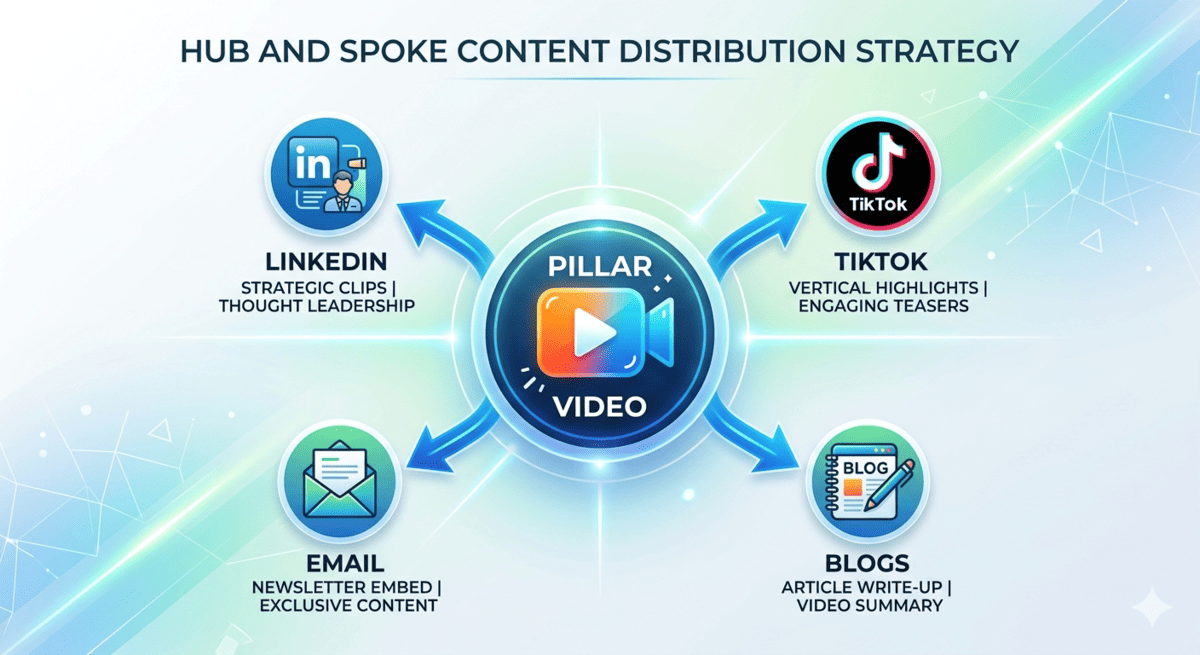
Instead of seeing it as a single asset, treat it as a content hub—something you can continuously break down, reshape, and distribute across multiple channels. This hub-and-spoke model means that all your social media activity is aligned, reinforcing the same message from different angles.
From experience working with businesses across Ireland, this shift in mindset is often what separates inconsistent content creation from a reliable, repeatable system. Small to medium enterprises (SMEs) often find that once they stop trying to "create" and start "documenting and distributing," the stress of digital marketing evaporates.
Step-by-Step: How to Turn One Video Into 10 Pieces of Content
1. Start With One Strong Core Video
Everything begins with the quality of the original video. You cannot polish a lackluster idea. Your pillar video should be rich in information, emotion, or utility.
This could be:
- A talking-head educational video: Sharing expertise on a specific industry problem.
- A client explanation or case study: Detailing a problem, the solution provided, and the results achieved.
- A behind-the-scenes video: Showing the "how" of your business, which builds immense trust.
- A short expert insight: A high-level take on a trending industry news item.
The key is that it contains multiple useful ideas, not just one narrow point. If your video is "5 Tips for Better Commercial Photography," you already have at least five distinct segments ready for extraction.
2. Create Short-Form Video Clips (3–5 Pieces)
Break the video into short, focused clips. These are the "trailers" for your brand. They should be edited vertically ($9:16$ aspect ratio) to suit mobile viewing.
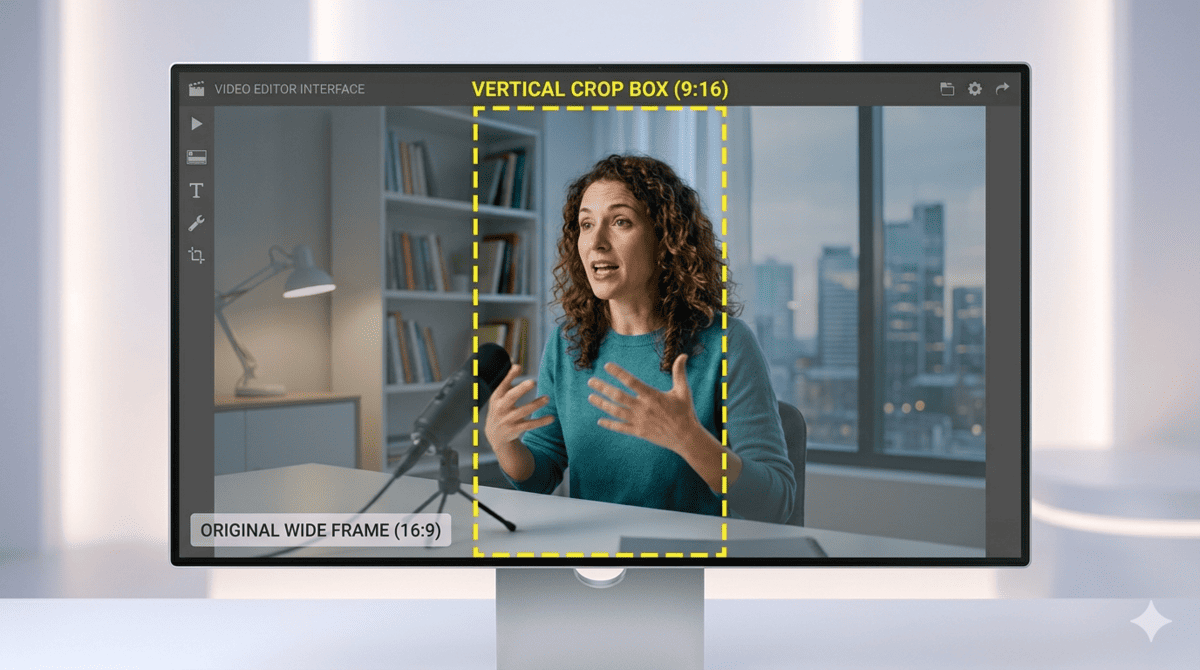
Each clip should:
- Highlight one key idea: Don't try to cram three points into 30 seconds. Focus on one.
- Be 15–60 seconds long: This is the "sweet spot" for retention on most social platforms.
- Start with a strong hook: You have about 1.5 seconds to stop someone from scrolling. Use a compelling headline or a provocative statement.
These clips can be used across:
- Social media feeds: Such as LinkedIn, Facebook, or X.
- Short-form video platforms: TikTok, Instagram Reels, and YouTube Shorts.
- Paid advertising: Short, punchy clips often perform better as "top-of-funnel" ads than long-form videos.
3. Turn Key Points Into Text Posts
Take the strongest insights and convert them into written content. Not everyone can watch a video at any given moment. Text allows for easy scanning.
This could be:
- A quick tip: A 2-3 sentence "pro-tip" taken directly from your video script.
- A short insight: A paragraph explaining the "why" behind a specific recommendation.
- A thought leadership post: A longer-form text reflection on the topic, inviting comments and debate.
This works particularly well for platforms where text-based content still performs strongly.
4. Create a Carousel Post
Carousels are ideal for breaking down information clearly.
Structure it like this:
- Slide 1: Hook or question: Use a bold title that addresses a specific pain point.
- Slides 2–6: Key breakdown points: Each slide features one tip or one step from your video.
- Final slide: Summary or call to action: Tell the viewer exactly what to do next (e.g., "Download the guide" or "Watch the full video").
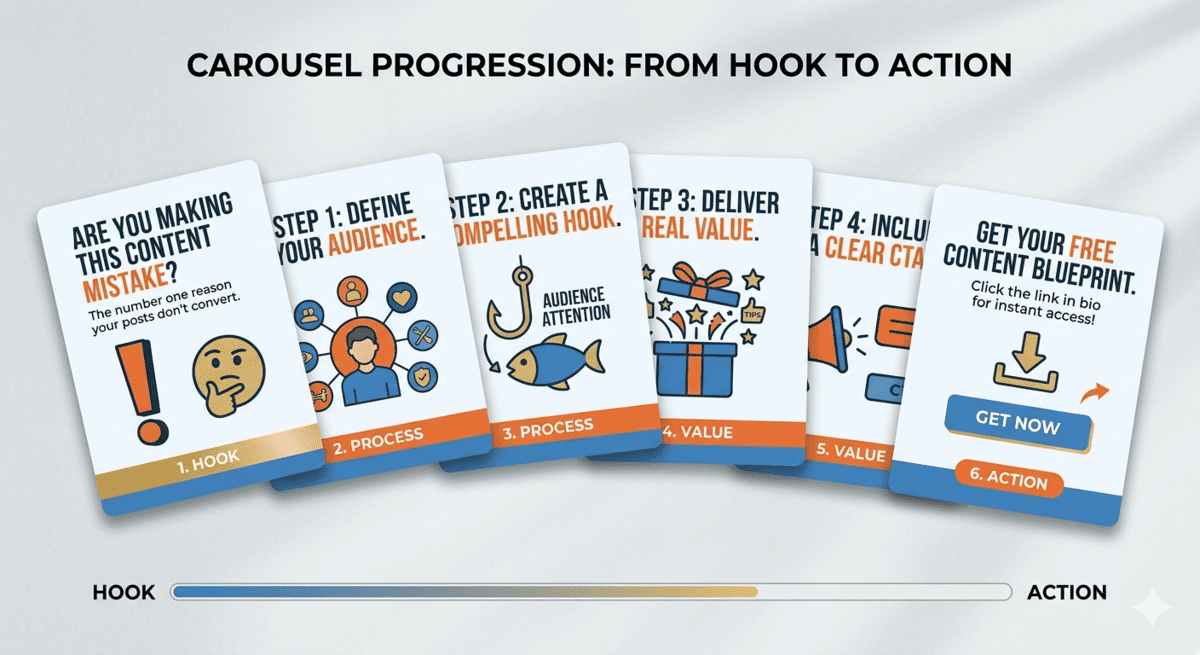
This format works especially well for educational content where a step-by-step process needs to be visualized.
5. Pull Out Quotes or Soundbites
Most videos contain strong one-liners or memorable insights. During the recording, you likely said something particularly profound or succinct without even realizing it.
Turn these into:
- Quote graphics: A simple background with a bold font featuring the quote and your name/handle.
- Caption posts: Using the quote as the "headline" of a social media caption.
- Standalone content pieces: Sharing a 5-second "soundbite" video loop of that specific quote.
These are quick to produce but highly effective for engagement. They are "snackable" content that people love to share on their own stories or profiles.

6. Write a Blog Section or Article
Use the video as the foundation for a blog post. Video and text work together to boost your website’s authority. You can embed the video at the top of the post to increase "dwell time" (how long someone stays on your page).
Expand on:
- Key points: Add more technical detail that might have been too "dry" for the video.
- Supporting examples: Cite specific statistics or external studies.
- Deeper explanation: Clarify complex concepts that need more than a few spoken sentences.
This also supports SEO and long-term organic visibility. Search engines can't "watch" your video to rank it, but they can crawl the text in your blog post.
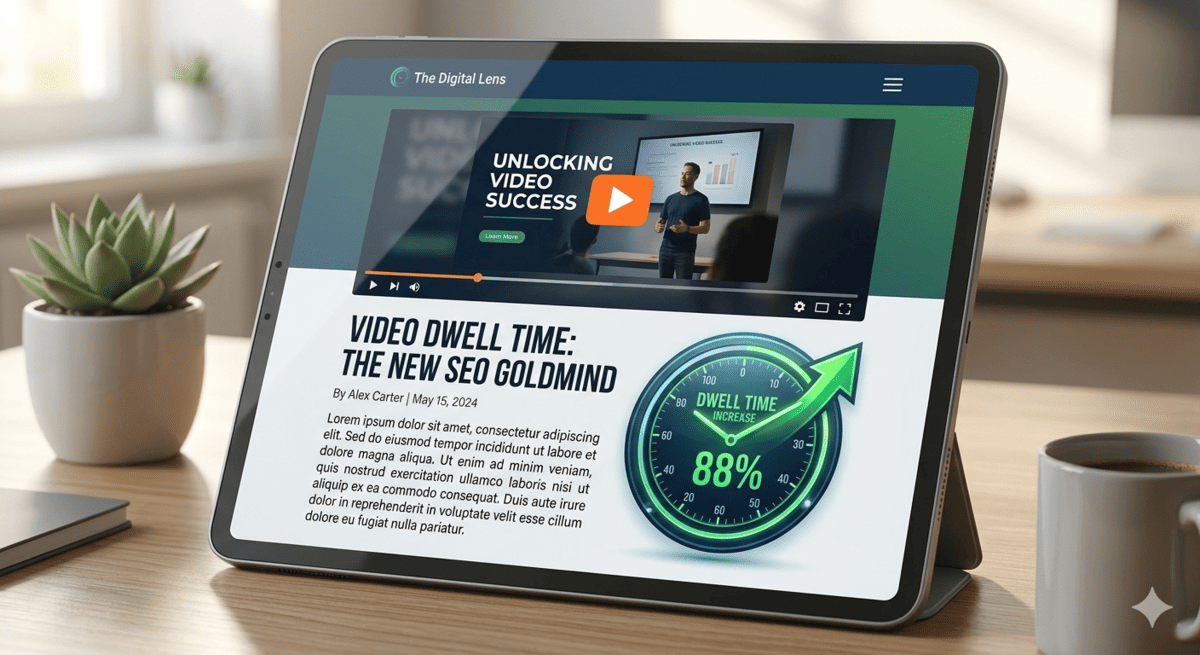
A blog layout showing an embedded video at the top to improve SEO dwell time and user engagement.
7. Create an Email Newsletter
Repurpose the main takeaway into an email update. Your email list is one of your most valuable assets because you own the connection to those people.
Structure:
- Context or intro: "We recently discussed [Topic] and I wanted to make sure you didn't miss this one key takeaway..."
- Main insight from the video: Summarize the most important lesson.
- Link or call to action: Direct them to the full video on your website or YouTube channel.
This keeps your audience engaged without needing new content ideas each time. It provides value directly to their inbox while driving traffic back to your primary video.

8. Turn It Into a FAQ Post
Identify the common questions your video answers and structure them into a FAQ format. If your video was about "How to Choose a Commercial Insurance Policy," you likely answered questions about cost, coverage, and timelines.
This is especially useful for:
- SEO visibility: Frequently Asked Questions often appear in "People Also Ask" sections on Google.
- Featured snippet opportunities: Concise, direct answers have a high chance of being featured at the top of search results.
- Customer education: It provides a quick reference for your sales team to send to prospects.

9. Use It for Stories or Behind-the-Scenes Content
Short clips from your video can also be used for more informal content. Stories (on Instagram, Facebook, or LinkedIn) are about "the now." They don't need to be highly produced.
Examples include:
- Story updates: A "talking head" clip of you explaining why you made the video.
- Process clips: Time-lapse footage of you setting up the camera or editing the footage.
- Casual insights: Bloopers or "off-the-cuff" remarks that didn't make the final cut.
This adds personality and helps humanise your brand. It shows the people behind the business, which is essential for building authentic connections.
10. Feed It Back Into Future Content
One of the most overlooked steps is using your content to inform future ideas. Your content is a data-gathering tool. By watching which repurposed pieces perform best, you learn what your audience wants more of.
You can:
- Expand on popular sections: If the "Tip #3" clip got 10x more views than the others, it deserves its own dedicated video.
- Create follow-up videos: Address the questions that appeared in the comments of your repurposed posts.
- Combine multiple clips into deeper topics: Once you have 10 videos on a subject, you can stitch the best clips together into a "Masterclass" or a "Year in Review" compilation.
This creates a continuous content cycle rather than isolated posts. It ensures that your content strategy is an evolving ecosystem rather than a series of one-off tasks.
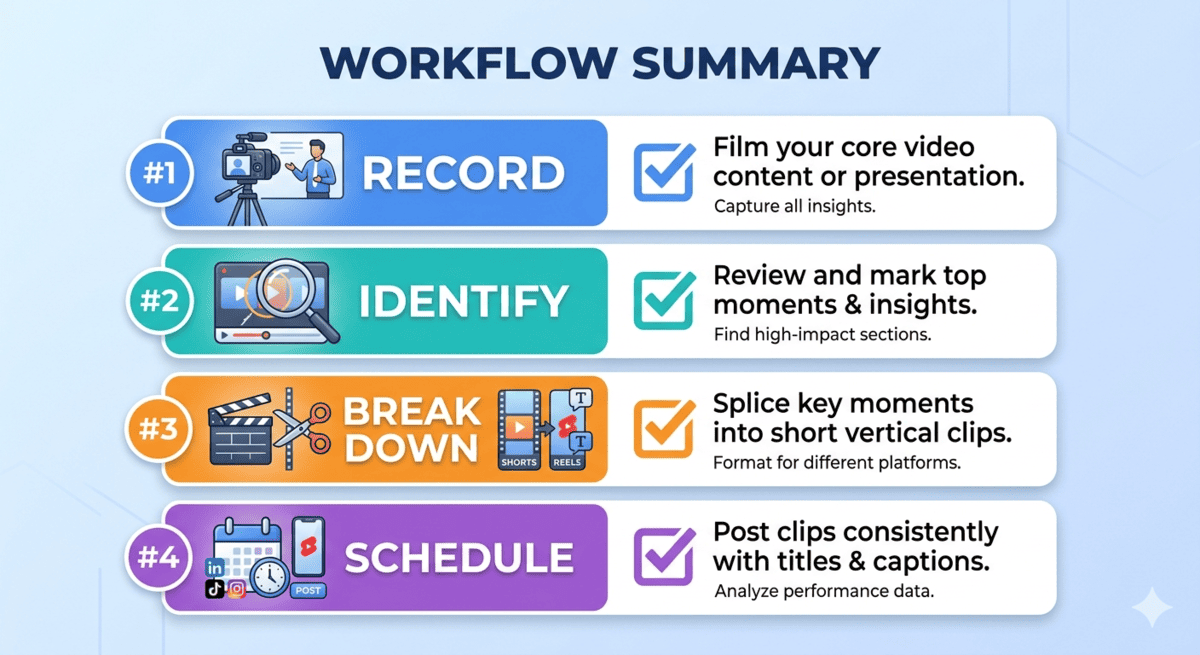
A Simple Workflow Businesses Can Follow
Efficiency is the enemy of overwhelm. To make repurposing work, you need a repeatable rhythm.
Step 1: Record One Video Per Week
- Set aside 60–90 minutes. Don't aim for perfection; focus on clarity and value. Ensure your audio is crisp, as this is the most important element for repurposing.
Step 2: Identify Key Moments
- Highlight strong hooks and insights while reviewing. While watching your playback, note the timestamps where you made a great point or told a compelling story.
Step 3: Break It Down
- Convert those moments into multiple content formats. Use tools to transcribe the audio into text, and editing software to "crop" the video into vertical segments.
Step 4: Schedule Across Platforms
- Spread content over time instead of posting everything at once. Use a scheduling tool to drip-feed these assets over the next 7–14 days. This keeps your brand "top of mind" without flooding your followers' feeds in a single hour.
Common Mistakes to Avoid
1. Repurposing Weak Content
If the original video lacks value, repurposing will not improve it.
2. Copying Content Across Platforms
Each platform requires slight adaptation in tone and format.
3. Overcomplicating the Process
You don’t need complex systems—start simple and refine later.
4. Prioritising Quantity Over Quality
Every repurposed piece should still feel intentional and useful.
How This Supports Long-Term Marketing
Repurposing content creates long-term advantages:
- Builds consistency without burnout
- Increases visibility across platforms
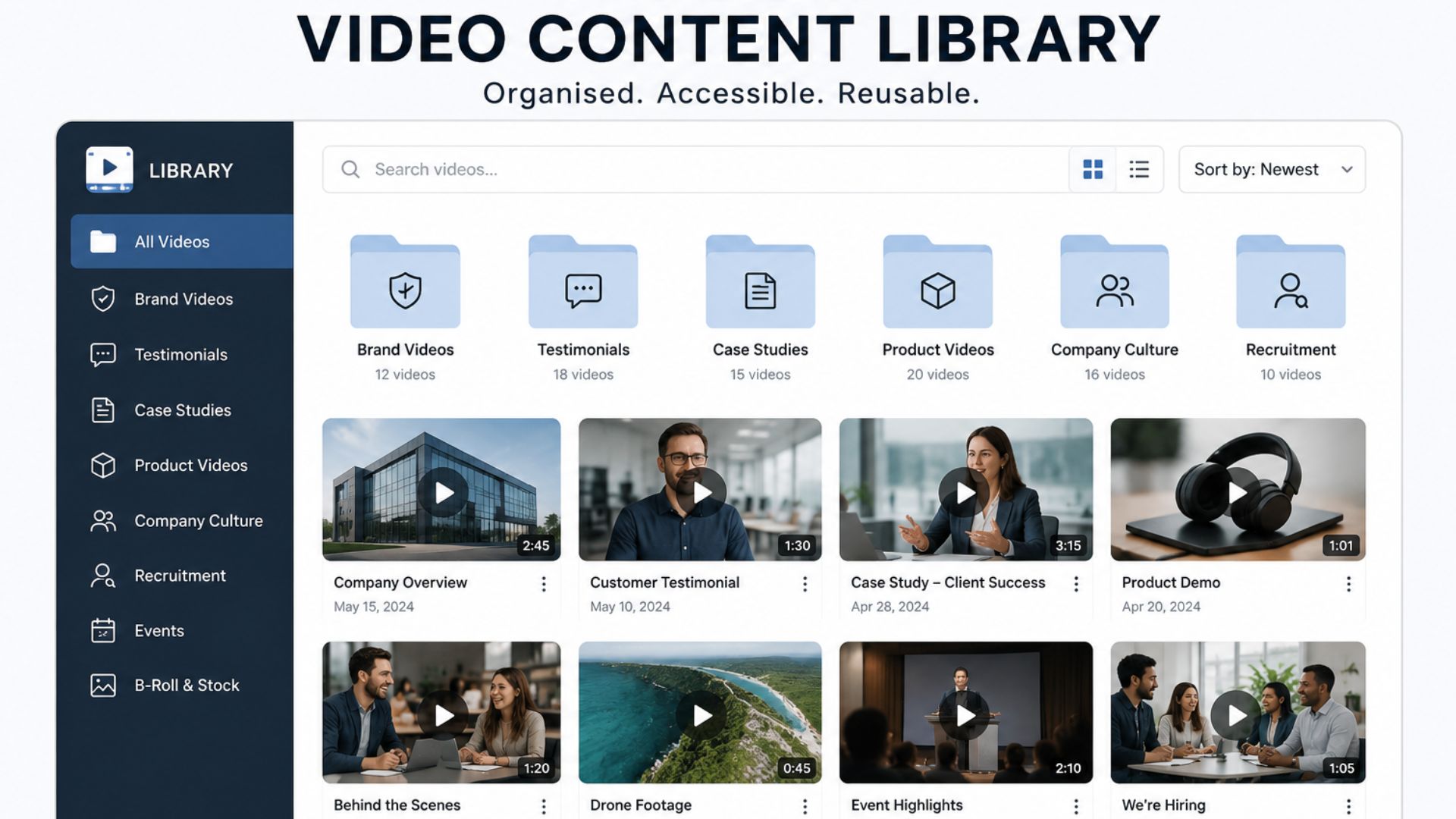
- Creates a reusable content library
- Strengthens brand recognition over time
Instead of constantly starting from scratch, you build a system that compounds over time.
From Ideas to a Working System
At this stage, most businesses understand the concept of content repurposing—but the real challenge is implementation. If you already have videos sitting unused, or you’re unsure how to structure a repeatable system for content creation, the next step is not more research. It’s building a clear process that turns your existing content into a consistent output system you can rely on every week.
At Mango Media, we help businesses build exactly that—video content systems that don’t stop at production. Instead, we focus on creating content that can be strategically broken down, repurposed, and distributed across multiple platforms to maximise long-term value.
If you’re ready to move from understanding the idea to actually implementing it, building that system is the next logical step.
Conclusion
One video should never be treated as just one piece of content. When it’s structured properly, it becomes a system that saves time, drives consistency, and keeps your business visible across platforms.
The businesses that win aren’t creating more content—they’re getting more from what they already have. Once you shift into a system-led approach, content becomes easier, faster, and far more effective.
Ready to build that system? Explore our video production services, try our instant price calculator, or get in touch today for a no-obligation conversation.
The goal is simple: stop letting good content sit unused, and start turning every video into a long-term asset that keeps working for your business.
Frequently Asked Questions
How do you turn one video into multiple pieces of content?
You break the video into short clips, written posts, visuals, and platform-specific formats like carousels and emails, each focusing on one key idea.
How many pieces of content can you get from one video?
Most businesses can realistically get around 8–12 pieces of content from a single well-planned video depending on its structure and depth.
What is the best way to repurpose a video for social media?
The most effective method is to create short-form clips, extract key quotes, and adapt the content into platform-specific formats like posts, carousels, and stories for maximum reach.
Similar blogs:






































![How to Write a Promo Video Script (Free Template Included) [2026 Guide]](https://cdn.prod.website-files.com/6226fcc37e2eb518b6e69a7f/69c3804c0b9ea78696bd89e0_covertab11.jpeg)





.jpg)
%20(1)%20(1).jpg)
.jpg)






We'd love to hear from you! Reach out to us today for a chat about our services, pricing, or just to say hello!


