
In today’s oversaturated inboxes, getting your email noticed — let alone opened — is no easy feat. In this article, we’ll explore the power of video in email campaigns, how to embed video content the right way, best practices to maximise performance, and how to track your results. Whether you’re a startup, marketer, or creative agency, using video in your emails can be a game-changer for audience retention and conversions.
Why the Video Brief Matters More Than Most Businesses Think

Before filming starts, the brief shapes almost everything that follows. It helps the videographer understand what the video needs to achieve, who it is for, how it will be used, and what practical constraints need to be considered from the outset.
Without that clarity, projects tend to become slower, less focused, and more revision-heavy. The final video may still look professional, but it can miss the mark if the business objective was never clearly defined in the first place.
A strong video brief can help with:
- More accurate pricing because the videographer understands the scope of the project properly
- Better creative direction because the message, audience, and objective are clear
- Smoother production days because the team can plan locations, contributors, and filming priorities in advance
- Fewer revisions because the final video is built around agreed goals from the start
- Better overall results because the project is aligned with a business need rather than just a visual idea
The good news is that a strong brief does not need to be long. It just needs to be clear.

1. Start With the Goal of the Video
The first thing any videographer or video production company needs to understand is why the video is being made in the first place.
It’s common for businesses to say they need a “promo video” or “a video for the website”, but that doesn’t tell the production team what the video actually needs to do. A more useful question is:
What does this video need to do for the business?
For example, the goal might be to:
- generate enquiries
- explain a service clearly
- support a recruitment campaign
- build trust with potential customers
- showcase an event
- introduce the company to a new audience
- improve internal communication
- support a product or service launch
The clearer the objective, the easier it is to shape the message, tone, structure, and call to action around it.
A useful way to write this in a brief is as a single sentence:
- “We want this video to help potential clients understand our service quickly when they visit the website.”
- “We need a recruitment video that gives candidates a genuine sense of our team culture.”
- “We want a short promotional video for LinkedIn to build awareness around an upcoming event.”
That level of clarity gives the videographer something concrete to work with. It also makes it much easier to assess later whether the video has done its job.

2. Define the Audience Clearly
Once the goal is clear, the next step is to explain who the video is for.
The same business might need very different videos depending on the audience. A video aimed at new customers will usually need to build trust and explain the offer clearly. A video aimed at staff may be more practical and information-led. A recruitment video may focus more on culture, team, and workplace experience.
Your brief should answer questions like:
- Who is the target audience?
- What do they already know about the business?
- What problem or question do they have?
- What do they need to understand after watching?
- What do we want them to do next?
For example:
The audience is marketing managers at mid-sized Irish businesses who may not know much about our service yet. The video will sit on our website and should help them understand what we do, how the process works, and why it is worth speaking to us.
That is far more useful than broad labels like “business owners” or “potential customers”. The more specific the audience, the easier it is to make good decisions about tone, structure, and messaging.

3. Clarify the Core Message
Once you know the goal of the video and who it is for, the next step is to define what the video actually needs to say.
A simple way to approach this is to ask:
If the viewer remembers one thing after watching, what should it be?
That stops the brief from becoming overloaded with too many competing messages.
Your brief should outline:
- the main message of the video
- the most important supporting points
- any key facts or claims that must be included
- the action or takeaway you want the viewer to leave with
For example, your main message might be:
- “We make corporate wellness simple for busy employers.”
- “Our software helps teams manage compliance more efficiently.”
- “We provide practical, high-quality video production for Irish businesses.”
Supporting points might include:
- your experience
- what makes the service different
- the result customers can expect
- how the process works
- any key trust signals or proof points
The goal is not to write the final script yourself. It is to give the videographer enough clarity to shape the message properly.

4. Explain Where the Video Will Be Used
This is one of the most overlooked parts of a video brief, but it has a direct impact on how the project is planned.
A homepage video, a LinkedIn promo, an event video, and an internal training video all serve different purposes. They often need different lengths, structures, formats, and calls to action.
Your brief should state clearly where the video will be used, for example:
- homepage
- service pages
- paid social ads
- YouTube
- sales presentations
- internal communications
- event screens
- email campaigns
This affects several important decisions.
Length
A short social media cutdown may only need to be 15–30 seconds. A homepage brand video might be 60–90 seconds. A service explainer or training video may need to be longer because it has to communicate more information.
Format
If the video needs to work across multiple channels, you may need different versions such as:
- widescreen for website or YouTube
- square or vertical edits for social media
- subtitled versions for silent autoplay
Tone and pacing
A video for internal use will usually feel different from a video designed to stop someone scrolling on LinkedIn.
If you already know you need multiple deliverables, include that in the brief from the start. It helps the videographer scope the project more accurately and plan the shoot with repurposing in mind.

5. Include the Practical Project Details
This is where the brief becomes genuinely useful from a production point of view. Even the best creative idea can become difficult to deliver if the practical details are unclear.
Useful practical details to include are:
Deadline or launch date
When does the final video need to be ready?
Is it tied to a specific campaign, product launch, conference, event, or internal milestone? If there is a hard deadline, it needs to be communicated early so the production timeline can be planned around it.
Filming location
Where will filming take place?
- at your office
- at a client site
- at an event venue
- across multiple locations
- in a studio
Location affects logistics, scheduling, travel, setup time, permissions, and sometimes the type of equipment needed.
People involved on camera
Who is likely to appear in the video?
- team members
- directors or founders
- customers
- presenters
- interview contributors
- event speakers
This matters because it influences scheduling, scripting, interview planning, and sometimes the style of the final video. A customer testimonial shoot, for example, needs a different approach from a founder-led company story video.
Deliverables needed
What final assets do you actually need?
Examples might include:
- one main video
- shorter social cutdowns
- different aspect ratios
- subtitled versions
- still frames or thumbnails
- a clean version without music for internal use
- a version for event screens
The more clearly this is outlined, the easier it is to scope the editing process accurately.
Approval process
Who needs to review and approve the video?
This is worth thinking about in advance because a lot of projects get slowed down by unclear feedback loops. If one person is managing the project but three directors need to sign off on the final edit, that should be understood from the beginning.
Budget range
Not every business knows the exact budget at the briefing stage, and that is fine. But if you have a rough budget range, it is worth sharing.
That helps the videographer recommend an approach that is realistic for the level of production required. It also reduces the risk of building a concept around a scope that is not actually viable within the available budget.

6. Share Example Videos — But Explain Why You Like Them
Reference videos can be extremely useful in a brief, but only if they come with context.
Sending a few links and saying “we want something like this” is a start, but it still leaves a lot open to interpretation. You might be responding to the tone, the pacing, the interview style, the cinematography, or simply the overall energy of the piece.
When sharing examples, explain the reason behind them.
For example:
- the pacing feels modern and energetic
- the interviews feel natural rather than scripted
- the visuals look polished without feeling overly corporate
- the storytelling feels warm and people-focused
- the structure is clear and easy to follow
- the tone feels premium but still approachable
This gives the videographer much more useful creative direction.
It can also help to mention what you want to avoid. For example:
- overly scripted delivery
- jargon-heavy messaging
- a style that feels too formal or too sales-led
That extra context reduces the risk of misalignment later.
7. Be Clear About Brand, Messaging, and Non-Negotiables
Some video projects are quite flexible. Others have specific messaging, compliance, or brand requirements that need to be respected from the outset.
If there are things that must be included, it is much better to flag them in the brief than to wait until the review stage.
This might include:
- brand guidelines
- logos and visual identity assets
- exact service or product terminology
- approved statistics or claims
- required legal wording
- tone-of-voice preferences
- key campaign messages
- specific people or locations that must be featured
It can also be useful to mention anything that should be avoided.
For example:
- “We want this to feel professional, but not overly corporate.”
- “We want to avoid jargon-heavy messaging.”
- “We do not want the video to feel too sales-led.”
- “We want the language to stay accessible to non-technical audiences.”
That kind of direction helps reduce the risk of getting a first cut that feels off-brand or misaligned with the way the business wants to present itself.
8. What You Do Not Need to Have Figured Out Yet
A lot of businesses delay contacting a videographer because they assume they need to have every detail worked out in advance. In reality, that is rarely the case.
You do not necessarily need:
- a final script
- a shot list
- a storyboard
- detailed technical knowledge
- a complete creative concept
- a precise runtime
That is often part of what a good videographer or production company helps with.
Your role is to provide the business context: what the video is for, who it is aimed at, what it needs to say, where it will be used, and what practical constraints matter. From there, the production team can help shape the creative approach, recommend the best format, and guide the project through the next stages.
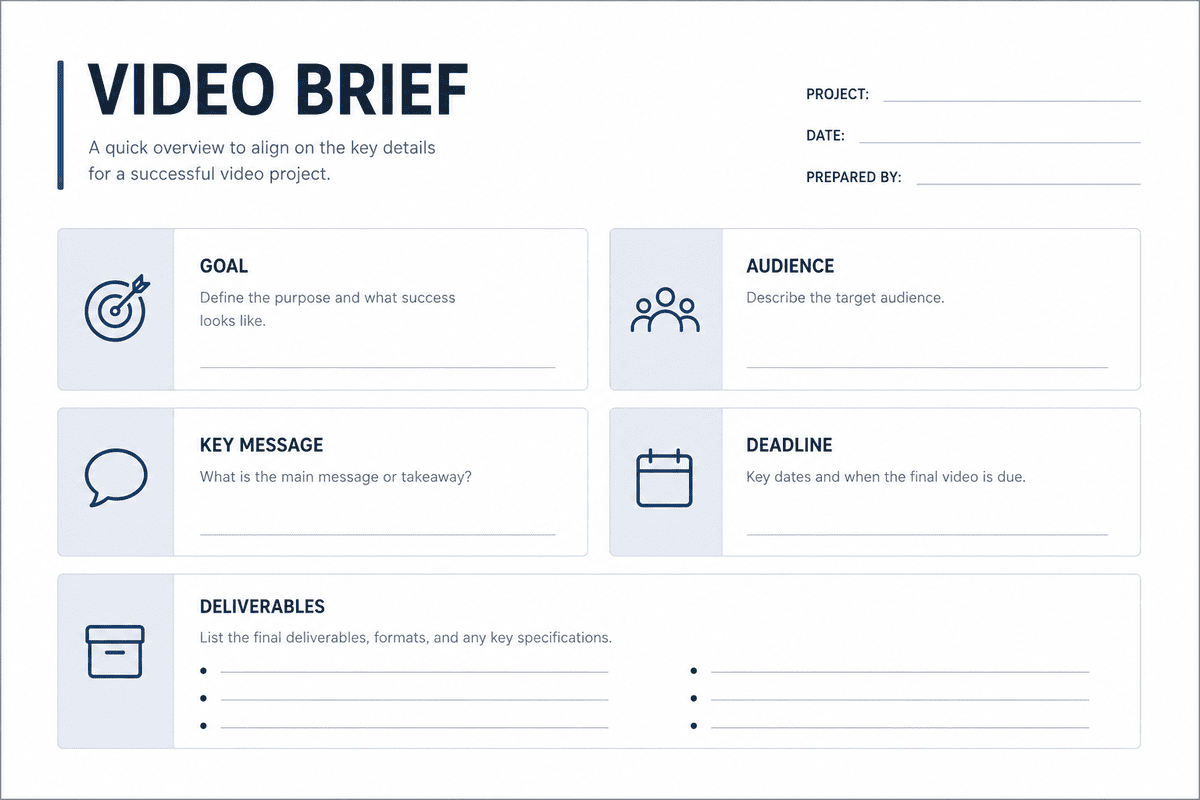
9. A Simple Video Brief Template You Can Use
If you want to keep the process simple, a brief can be as straightforward as this:
Video Brief Template
Project name
A short working title for the video.
Goal of the video
What business result should it support?
Target audience
Who is the video for?
Main message
What should viewers understand or remember?
Where the video will be used
Website, LinkedIn, Instagram, internal comms, event screens, paid ads, etc.
Preferred style or examples
Links to videos you like, with a short note explaining why.
Deadline
When does the final video need to be delivered?
Budget range
If known, include a rough figure or range.
Filming location(s)
Where is filming likely to take place?
People involved
Who needs to appear on camera or approve the project?
Deliverables needed
Main video, social cutdowns, subtitles, different formats, stills, and so on.
Brand or messaging notes
Any required terminology, visual guidelines, or non-negotiables.
This does not need to be a formal document. It can be a short written brief, a planning note, or the basis of a discovery call. What matters is that the right information is captured early.

10. Common Mistakes Businesses Make When Briefing a Videographer
A brief does not need to be perfect, but there are a few common mistakes worth avoiding.
1. Being too vague about the objective
If the brief simply says “we need a promo video”, it may not be clear whether the goal is awareness, lead generation, recruitment, or explanation.
2. Trying to fit too many messages into one video
One video cannot do everything well. Trying to explain every service, speak to every audience, and serve every platform usually weakens the message.
3. Forgetting to mention where the video will be used
This affects length, format, pacing, and editing decisions. Leaving it out often leads to avoidable revisions later.
4. Not discussing budget or deadlines early enough
The videographer can only recommend the right approach if they understand the practical constraints around time and budget.
5. Leaving too many stakeholders out of the process
If several people need to sign off, it helps to know that from the beginning so feedback can be managed properly.
6. Focusing only on visuals rather than business outcomes
A video can look polished and still underperform if it is not aligned with the right business goal.
What a Good Brief Makes Easier for Everyone
Once the brief is clear, almost every stage of the project becomes easier.
For the videographer, it means:
- better planning
- better creative decisions
- more accurate pricing and scoping
- fewer assumptions
- a smoother production and editing process
For the business, it means:
- less back-and-forth
- fewer delays
- clearer expectations
- a more efficient feedback process
- a better chance of ending up with a video that actually supports the intended goal
In our experience working with Irish businesses on different types of video projects, the strongest productions usually begin with a clear objective and a brief that gives enough context to guide the creative and production decisions from the outset. It does not need to answer every possible question, but it should make the purpose of the project obvious.

From Briefing to Better Results
Once the brief is clear, everything else becomes much easier — from planning and filming to feedback and final delivery. The goal is not to overcomplicate the process, but to give your videographer the information they need to make good decisions early, avoid unnecessary revisions, and create a video that supports the right business outcome.
Conclusion
Knowing how to brief a videographer properly can save time, reduce confusion, and lead to a much stronger final result. A good brief does not need to be complicated, but it should clearly explain the purpose of the video, who it is for, what it needs to say, and how it will be used.
If you’re planning a video project and want support shaping the brief, you can explore our video production services, try our instant price calculator, or get in touch with the Mango Media team for a no-obligation conversation.
Frequently Asked Questions
What should I include in a video production brief?
A video production brief should include the goal of the video, target audience, key message, deadline, budget range, filming location, deliverables, and where the video will be used.
How detailed should a brief for a videographer be?
A brief should be clear enough to explain the project goals, audience, timeline, and preferred style, but it does not need to include technical production details.
Do I need a script before hiring a videographer?
Not always. Many businesses begin with a clear brief rather than a finished script, and the videographer or production company can help shape the concept and messaging from there.
Similar blogs:

































![How to Write a Promo Video Script (Free Template Included) [2026 Guide]](https://cdn.prod.website-files.com/6226fcc37e2eb518b6e69a7f/69c3804c0b9ea78696bd89e0_covertab11.jpeg)



.jpg)
%20(1)%20(1).jpg)
.jpg)






We'd love to hear from you! Reach out to us today for a chat about our services, pricing, or just to say hello!


