
In today’s oversaturated inboxes, getting your email noticed — let alone opened — is no easy feat. In this article, we’ll explore the power of video in email campaigns, how to embed video content the right way, best practices to maximise performance, and how to track your results. Whether you’re a startup, marketer, or creative agency, using video in your emails can be a game-changer for audience retention and conversions.
What Is Sales Enablement?
Sales enablement is the process of giving sales teams the content, tools and resources they need to have more effective conversations with potential customers.
That can include:
- Sales presentations
- Case studies
- Product information
- Proposal documents
- FAQs
- Training materials
- Customer testimonials
- Product demonstrations
- Video content
The goal isn't to give salespeople more content for the sake of it.
It's to help them:
- Start better conversations
- Explain complex solutions
- Answer common questions
- Build credibility
- Overcome objections
- Keep prospects engaged
- Move opportunities forward
Video can be particularly useful because it combines visual information, spoken explanation and human communication in one format.
But it works best when it has a specific job within the sales process.
Why Should Sales Teams Use Video?
Salespeople often find themselves repeating the same explanations across calls, emails and presentations.
Video can turn some of those repeated explanations into reusable sales assets.
Instead of writing a long email explaining how your process works, a salesperson could send a short walkthrough.
Instead of attaching a lengthy document about a complicated product, they could share a demonstration.
Instead of sending another written case study, they could share a customer telling the story in their own words.
The benefit isn't just efficiency.
Video can also make sales communication feel more personal. A short video from a salesperson can feel more direct than another templated follow-up email, which can be particularly useful in B2B sales where decisions often involve multiple stakeholders and longer consideration periods.
The important question isn't:
"What sales videos should we create?"
It's:
"Where would video make our sales process more effective?"
Where Can Sales Teams Use Video?
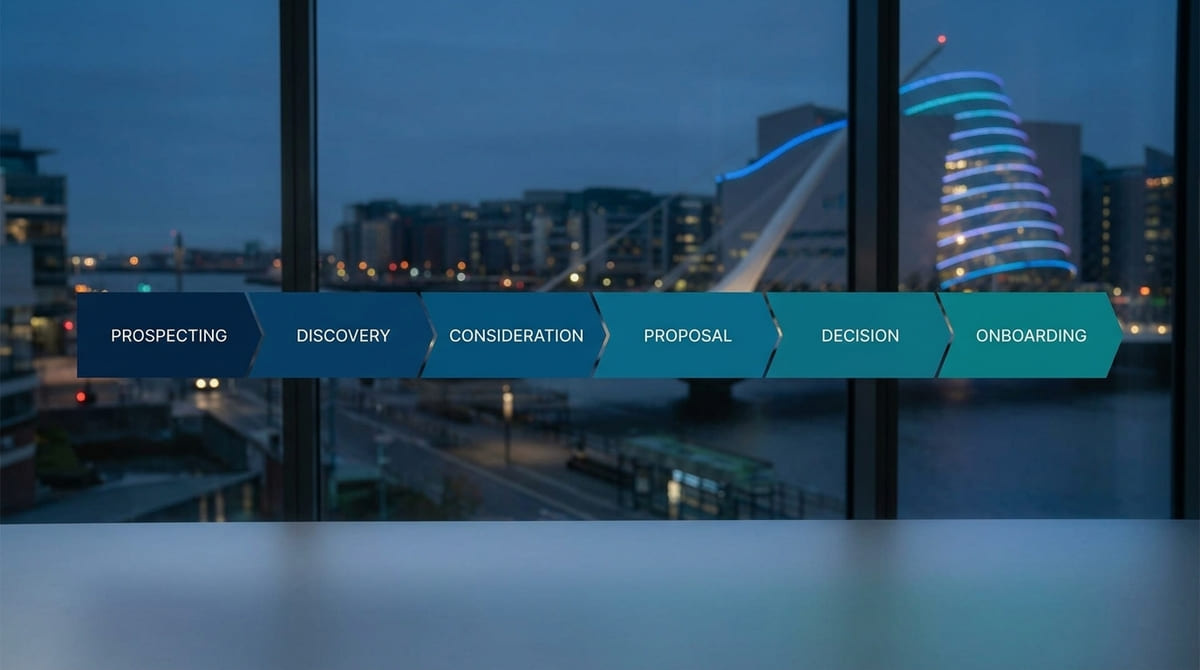
Video can support different stages of the buying journey, from initial outreach through to proposals, decision-making and onboarding.
The most effective approach is to connect each video to a specific stage or sales challenge.
1. Use Video for Prospecting and Personalised Outreach
Getting a prospect's attention is difficult when their inbox is already full of sales messages.
A short personalised video can make an outreach message feel more relevant and human.
For example, a salesperson might briefly explain:
- Why they're reaching out
- Something they've noticed about the prospect's business
- A potential challenge or opportunity
- How their company could help
- What they'd like to discuss
The video doesn't need to be highly produced.
For one-to-one prospecting, relevance and authenticity can matter more than cinematic production.
Keep it short and focused on earning the next conversation.
A simple structure is:
Personal introduction → Relevant observation → Potential opportunity → Next step
The salesperson isn't trying to deliver the entire pitch.
They're giving the prospect a reason to continue the conversation.

2. Use Video After a Discovery Call
The follow-up after a discovery call is another strong opportunity.
Instead of sending:
"Great speaking with you. Here's some information about our services."
a salesperson can send a short video that reflects what was actually discussed.
For example:
"Based on what you told me about your current recruitment challenge, I wanted to show you how we'd approach the first stage."
The video could cover:
- The prospect's main challenge
- The recommended approach
- A relevant example
- Answers to questions raised during the call
- The next step
This makes the follow-up feel tailored rather than generic.
It also gives the prospect something they can revisit or share with colleagues who weren't on the original call.
That's where video becomes more than a marketing asset.
It becomes part of the sales conversation itself.
3. Explain Products, Services and Complex Processes
Some products and services are difficult to explain clearly through email or a sales presentation.
This is particularly true when buyers need to understand:
- Technical features
- Multiple stages
- Different service options
- Complex processes
- New systems
- Unfamiliar concepts
Video can show the solution in context rather than asking the prospect to imagine how it works.
A product demonstration might show a particular workflow.
A professional services company might explain its methodology.
A B2B business might visually walk a prospect through its implementation process.
The key is to focus on what the buyer needs to understand, rather than trying to explain everything.
A useful product or service video should answer:
What is it?
How does it work?
What problem does it solve?
Why does it matter to the buyer?

4. Answer FAQs and Overcome Sales Objections
Your sales team already knows which questions prospects ask repeatedly.
Those questions are valuable content opportunities.
They might include:
- How much does it cost?
- How long does it take?
- What does implementation involve?
- What happens if we need changes?
- Do you work with businesses like ours?
- What results can we expect?
- What makes you different?
- What happens after we sign?
Instead of answering these questions individually every time, some can become reusable videos.
The same applies to common objections.
If prospects regularly worry about cost, implementation, complexity or whether the solution is right for their business, create content that addresses the underlying concern.
For example, a video could explain what influences pricing, show how implementation works or demonstrate how a similar business used the solution.
The goal isn't to create videos that aggressively "overcome objections."
It's to give buyers the information they need to make a more confident decision.
5. Use Customer Stories at the Decision Stage
When a prospect is close to making a decision, credibility becomes particularly important.
A customer story can provide evidence that your solution works for businesses facing similar challenges.
Video adds another layer because the customer can explain:
- What problem they had
- Why they chose the company
- What the experience was like
- How the solution was implemented
- What changed afterwards
This can make the proof feel more authentic than simply telling prospects how good your business is.
The important part for sales enablement is timing.
Don't just leave the testimonial on your website and hope prospects find it.
If a prospect raises concerns about whether your company has experience in their industry, the salesperson can send a relevant customer story immediately afterwards.
The content becomes useful because it is connected to a real sales conversation.

6. Use Video Alongside Proposals
A proposal can contain a lot of information:
- Pricing
- Deliverables
- Recommendations
- Timelines
- Technical details
- Implementation information
- Terms
Even when a prospect receives everything they need, they may still have questions about why a particular solution was recommended.
A short proposal walkthrough can help.
A salesperson could record a two-minute video explaining:
- What has been recommended
- Why it was recommended
- How it addresses the prospect's needs
- What happens next
The video doesn't replace the proposal.
It gives the prospect a human explanation alongside it.
For larger B2B opportunities, this can be taken further with a personalised proposal video that references the specific company, challenge and recommended solution.
It doesn't need to look like a commercial.
For personalised sales communication, clarity and relevance are more important than elaborate production.
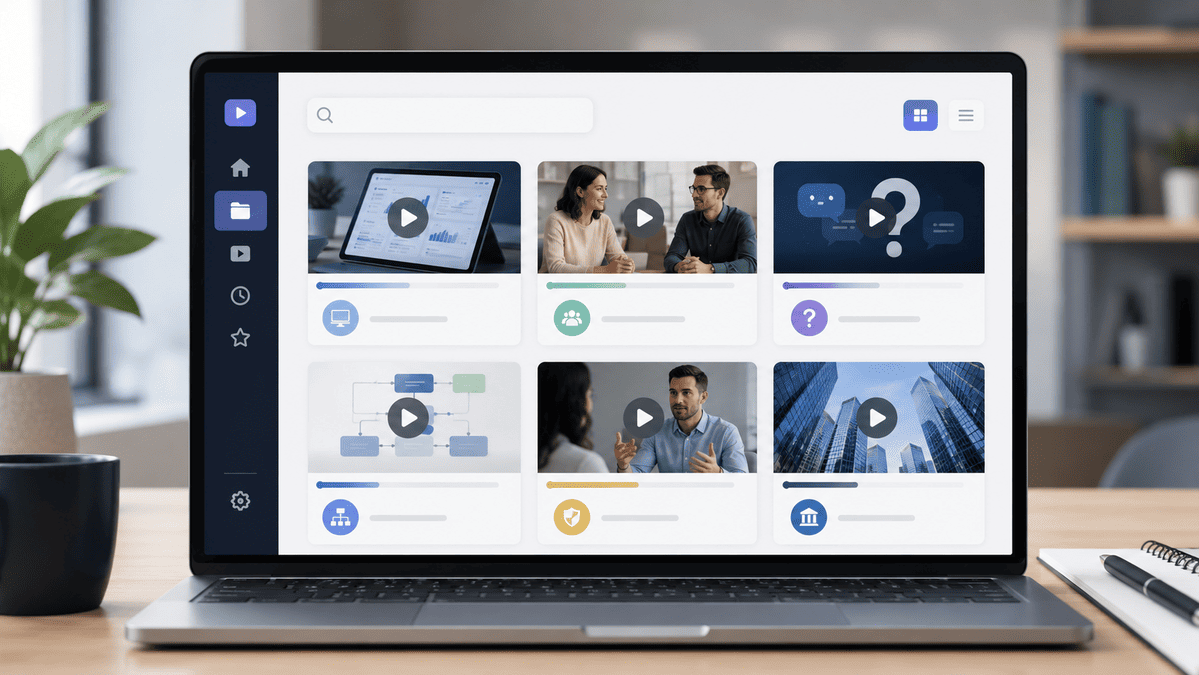
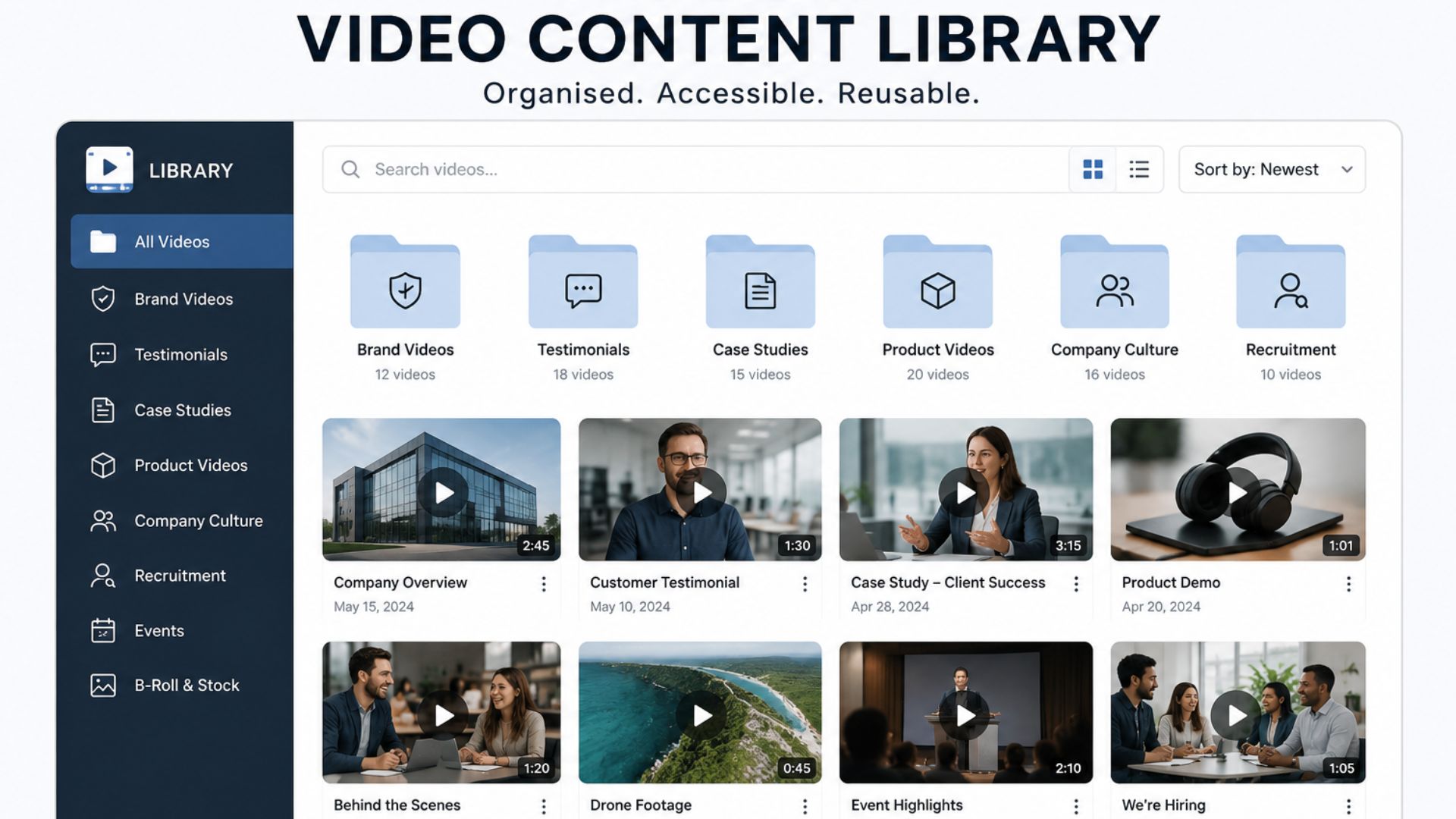
7. Build a Sales Video Library
Once a business starts creating useful sales videos, the next challenge is making sure the sales team can actually use them.
Instead of creating isolated videos, build a library of reusable assets such as:
- Service explainers
- Product demonstrations
- Customer stories
- Process walkthroughs
- FAQs
- Objection-handling videos
- Industry-specific examples
- Short company introductions
These can then be organised around the sales journey:
Prospecting → Discovery → Consideration → Proposal → Decision → Onboarding
A salesperson should be able to quickly identify:
"This prospect has this particular question. Here's the video that answers it."
That makes video a practical sales resource rather than a collection of files sitting in a marketing folder.
It also means salespeople don't have to recreate the same explanation from scratch every time.
8. Use Video for Internal Sales Training and New Launches
Sales enablement isn't only about content that salespeople send to prospects.
Video can also help sales teams understand new products, services and processes internally.
For example, when a new service launches, a short internal video could explain:
- What it is
- Who it's for
- What problem it solves
- How it works
- How the sales team should position it
- What questions prospects are likely to ask
This gives salespeople a consistent starting point before they begin talking to customers.
The same production can sometimes support multiple audiences.
A product shoot, for example, might generate:
- Internal training content
- A customer-facing demonstration
- A website video
- Short social clips
- Sales presentation material
The key is to identify those requirements before filming, rather than trying to create them after the production is finished.
How to Integrate Video Into Your Sales Process
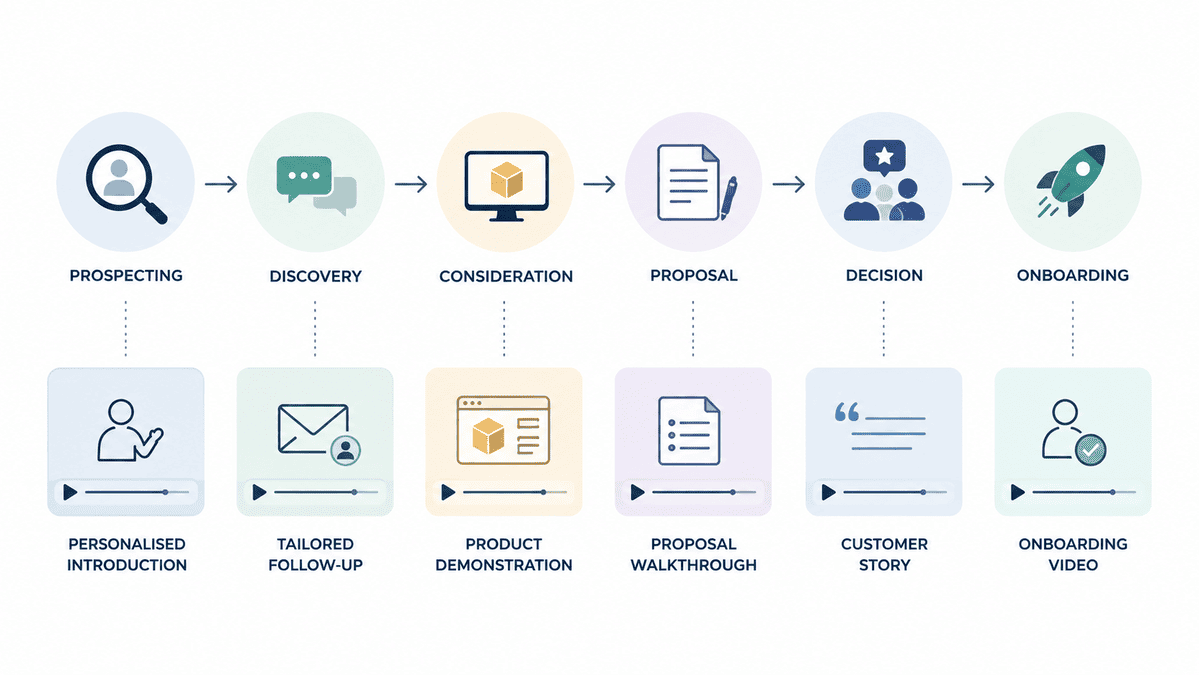
Video becomes even more useful when it is connected to the systems your sales team already uses.
For example:
New prospect
→ Personalised introduction
Discovery completed
→ Tailored follow-up
Product needs explaining
→ Demonstration
Objection raised
→ Relevant FAQ or explainer
Proposal sent
→ Proposal walkthrough
Decision pending
→ Customer story
Deal won
→ Onboarding video
This creates a repeatable system.
Instead of constantly asking:
"What video should we make?"
your team can ask:
"Where in our sales process would video improve this interaction?"
That's a much more strategic way to approach sales enablement.
How to Build a Sales Enablement Video Strategy
You don't need to produce dozens of videos immediately.
Start with the sales process you already have.
1. Identify recurring questions
Ask your sales team:
What do prospects ask repeatedly?
Those questions can reveal your first video opportunities.
2. Identify sales bottlenecks
Where do opportunities tend to slow down?
Is it:
- Price?
- Trust?
- Product understanding?
- Implementation?
- Differentiation?
- Internal approval?
Focus your first videos around those problems.
3. Map video to the buying journey
Identify where video could support:
Prospecting → Discovery → Consideration → Proposal → Objection Handling → Decision → Onboarding
4. Prioritise reusable assets
Don't try to create everything at once.
Start with a small group of videos that can be used repeatedly, such as:
- One strong service or product explainer
- A few FAQs
- Customer stories
- A process overview
- A product demonstration
5. Build around real sales conversations
Your sales team already knows what buyers struggle with.
Use those conversations to shape the content.
The best sales enablement videos often answer questions that prospects are already asking.
Do Sales Enablement Videos Need to Be Professionally Produced?
Not every sales video needs professional production.
A salesperson recording a personalised follow-up can actually benefit from feeling informal and authentic.
But other assets may be used repeatedly across the sales organisation and deserve a higher level of production.
These could include:
- Product demonstrations
- Service explainers
- Customer case studies
- Brand introductions
- High-value proposal videos
- Product launch content
- Sales presentations
- Evergreen training resources
For these types of assets, professional production can improve the visual quality, audio, structure, storytelling and brand consistency.
The key is choosing the right production level for the job.
A personalised prospecting video doesn't need to look like an advertisement.
An evergreen product film that will be shown to hundreds of prospects may justify a much more polished production.

How to Measure Sales Enablement Video Success
Don't judge sales enablement video purely by views.
A video watched by 100 highly relevant prospects may be more valuable than one watched by 10,000 people who will never become customers.
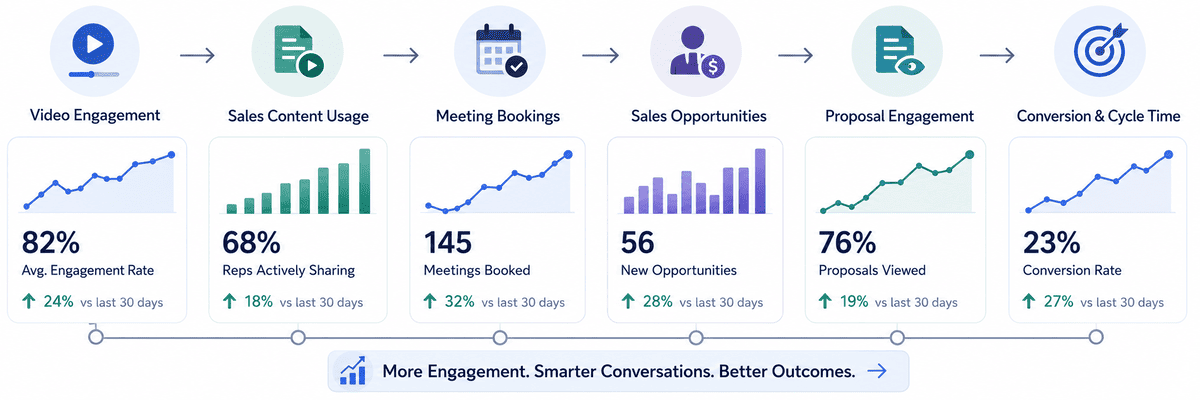
Depending on the video, useful measures could include:
- Video engagement
- Content usage by salespeople
- Meeting bookings
- Sales opportunities
- Proposal engagement
- Conversion rates
- Sales-cycle length
The most important question is:
Is the video helping the sales team move qualified opportunities forward?
That's the outcome that matters.
Common Sales Enablement Video Mistakes
Creating videos without a sales use case
A beautifully produced video is still ineffective if salespeople don't know when or why to use it.
Start with the sales problem.
Making everything too promotional
Sales enablement content should help buyers make decisions, not make every interaction feel like an advertisement.
Making videos unnecessarily long
If a salesperson needs to answer one question, they probably don't need a 10-minute video.
Keep each asset focused.
Creating one video for everyone
Different buyers have different questions.
A library of focused videos can be more useful than one enormous company presentation.
Forgetting the sales team
Marketing may know what content looks good, but salespeople know what prospects actually ask.
Involve sales when deciding what to create.
Letting content become outdated
Products, pricing, processes and teams change.
Review your sales video library regularly and update assets when the information is no longer accurate.
Plan Your Video Production Around the Sales Journey
One of the biggest opportunities is to plan sales content alongside your wider video strategy.
A single production could potentially generate a main customer story, shorter sales clips, website content, social assets and presentation material.
A product shoot could similarly support demonstrations, sales presentations, website content, social clips and training.
The more of these requirements you identify before filming, the easier it becomes to capture the right interviews, demonstrations and supporting footage.
Instead of producing one video for one purpose, you're building a library of useful content around the same production investment.
Turn Sales Conversations Into Video Opportunities
The most useful sales enablement videos usually don't begin with a camera.
They begin with a real question, objection or point of friction in the sales process.
If your team is repeatedly explaining the same thing, sending the same follow-up information or answering the same questions, that's a signal that video could turn that explanation into a reusable sales asset.
The goal isn't to create more content.
It's to create the right content for the moments when your sales team needs it most.
Ready to Build Video Into Your Sales Process?
When video is planned around real sales conversations, it can become much more than marketing content. It can help your team explain complex ideas, personalise follow-ups, strengthen proposals, answer objections and give prospects the confidence to take the next step — while creating reusable assets that continue supporting your sales process long after the original production.
If you're looking to build video into your sales process, explore Mango Media's video production services or use the instant price calculator to get an initial idea of your project. If you already know where your sales team needs support, get in touch with the Mango Media team and let's discuss what could work for your business.
Frequently Asked Questions
What is sales enablement video?
Sales enablement video is video content designed to help sales teams communicate more effectively with prospects and customers. It can support prospecting, product demonstrations, follow-ups, proposals, objection handling, customer stories and internal sales training.
How can video help sales teams?
Video can help sales teams explain complex products or services, answer common questions, personalise follow-ups, build trust and give prospects useful information between conversations. The most effective sales videos are connected to specific stages or challenges in the sales process.
What types of videos are useful for sales enablement?
Useful sales enablement videos include product demonstrations, service explainers, customer stories, FAQ videos, process walkthroughs, personalised prospect videos, proposal videos, objection-handling content and internal training videos. The right mix depends on the questions and obstacles your sales team encounters most often.
Similar blogs:
































![How to Write a Promo Video Script (Free Template Included) [2026 Guide]](https://cdn.prod.website-files.com/6226fcc37e2eb518b6e69a7f/69c3804c0b9ea78696bd89e0_covertab11.jpeg)






.jpg)
%20(1)%20(1).jpg)
.jpg)





We'd love to hear from you! Reach out to us today for a chat about our services, pricing, or just to say hello!


